Compiling WSJT 10 on Linux
Archive post.
Translated from Ukrainian.
Lately I’ve been keeping all my ham radio software in one virtual machine for contests. That way the software settings stay consistent between my home computer and my laptop. Then I needed WSJT on Linux, and it turned out the latest version isn’t in the repositories. So we’ll compile it ourselves, and of course it took a few hacks to get there.
First, install the dependencies. This is where most of the trouble is, because the build uses old libraries that may conflict with the ones already installed. I got around it by downgrading one of the required libraries with this command. That can break things, so make backups.
sudo apt install libpython3.5-minimal=3.5.1-10
update 30 jul 2018: I found a better way: download a recent python3.5-dev deb package by hand from https://launchpad.net/~ubuntu-security/+archive/ubuntu/ppa/+build/11219268
wget https://launchpad.net/~ubuntu-security/+archive/ubuntu/ppa/+build/11219268/+files/python3.5-dev_3.5.2-2ubuntu0~16.04.1_amd64.deb
wget https://launchpad.net/~ubuntu-security/+archive/ubuntu/ppa/+build/11219268/+files/libpython3.5-dev_3.5.2-2ubuntu0~16.04.1_amd64.deb
sudo dpkg -i libpython3.5-dev_3.5.2-2ubuntu0~16.04.1_amd64.deb
sudo dpkg -i python3.5-dev_3.5.2-2ubuntu0~16.04.1_amd64.deb
If you know a cleaner way to do this, tell me in the comments.
So, the libraries you need:
sudo apt install git-core libsamplerate0-dev libfftw3-dev portaudio19-dev gfortran python3-numpy python3-dev python3-tk python3-pil.imagetk
Download the source code:
git clone https://git.code.sf.net/p/wsjt/wsjt_orig wsjt-wsjt_orig
It ends up in the wsjt-wsjt_orig folder. Go into it and configure the source with the documentation turned off, because the docs refused to build.
cd wsjt-wsjt_orig
./configure --disable-manpages --disable-docs
At the end you should get output like this. If you don’t, some packages are missing.
Configuration Summary
——————————————-

Install prefix …….: /usr/local/wsjt
Package …………..: WSJT 10.0
Build Docs ………..: Yes
Build Manpages …….: Yes
Python2 …………..: /usr/bin/python 2.7.1
Python3 …………..: /usr/bin/python3 3.5.1
F2py ……………..: /usr/bin/f2py
Fcompiler: ………..: gfortran
FC Lib Path ……….: /usr/lib/gcc/x86_64-linux-gnu/5/
Samplerate ………..: OK
FFTW3 …………….: OK
Portaudio …………: OK
Copyright………….: Copyright (C) 2001-2016 Joseph H Taylor, Jr, K1JT
Website …………..: http://www.physics.princeton.edu/pulsar/K1JT/wspr.html
Report Bugs To …….: <[email protected]>

Finished Configuration

To build, type …: make
Then compile and install it the old way, which isn’t the right way but has always worked:
make
sudo make install
Or use checkinstall. For details, see the official documentation, “Compiling and installing programs from source”.
sudo apt-get install checkinstall
sudo checkinstall
Run it with: /usr/local/wsjt/bin/wsjt
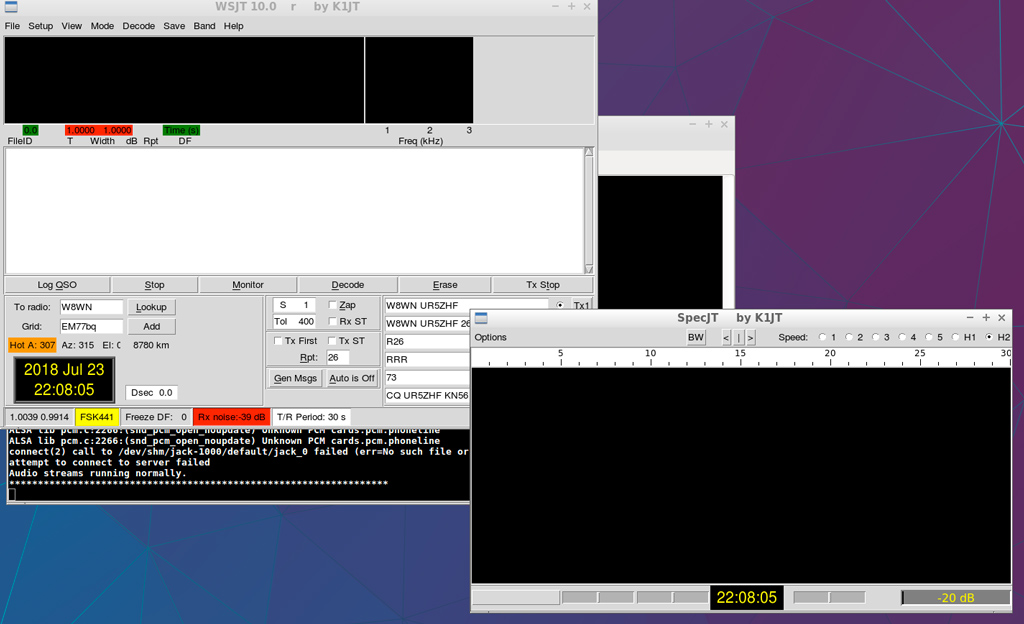
WSJT 10 compiled from source on Linux